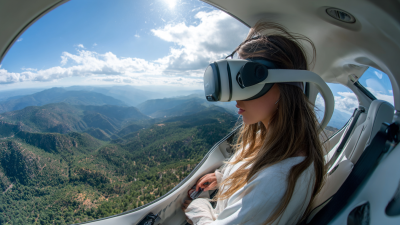
Virtual reality has really changed the way we get to experience all kinds of activities, and VR Standing Flight is a perfect example. It’s this super immersive experience where you get to feel like you're flying — all while standing! Honestly, there’s a pretty special sense of freedom that comes with it. Companies like VR Innovators and FlightSim Co. are really pushing the envelope, creating some pretty captivating VR worlds. That said, while it can be a total thrill, it’s also important to be prepared and know what you’re doing.
When you dive into VR Standing Flight, a bunch of things come into play. First off, good posture and being aware of your surroundings are key. Make sure you have enough space around you — nobody wants to bump into things mid-flight! And don’t forget about your gear — quality headsets, reliable tracking, comfy accessories — all make a big difference. A lot of people overlook the fact that tweaking settings for your personal comfort is just as important as the equipment itself.
Of course, it’s not always smooth sailing. You might run into issues like motion sickness or feeling a little disoriented — it’s totally normal. The trick is to listen to your body, take breaks when needed, and not push yourself too hard. Once you get the hang of it and learn to handle these little hiccups, your experience flying in VR can be seriously next level. So go ahead, embrace the adventure, and let your love for flying take you on some pretty amazing virtual journeys!
Creating an optimal VR space for flight experiences requires careful planning and attention to detail. According to industry surveys, users report up to a 40% increase in immersion with the right setup. Start by ensuring your area is at least 6.5 feet by 6.5 feet. This space allows for movement without hitting obstacles. Clear away furniture and other distractions. A clutter-free environment is essential for preventing accidents during intense sessions.
Proper lighting is another critical element. Dim lights enhance the VR experience, while overly bright spaces can cause discomfort. Consider using soft LED lights to create a cozy atmosphere. Sound isolation enhances immersion, as background noise can pull users out of the experience. Thick curtains or soundproofing panels can make a significant difference. Surveys indicate that noise distractions can reduce focus by 30%.
Lastly, ergonomic accessories enhance long-duration usage. A good VR headset stand and appropriate cushioning can alleviate fatigue. Remember, even well-planned spaces can face issues. Users may encounter motion sickness or discomfort due to prolonged usage. Regular breaks and hydration are essential to maintain comfort during flights.
When considering a virtual reality (VR) standing flight experience, understanding the various types of VR flight simulators is essential. Common options include full-motion simulators, which replicate the sensations of flying with precise movements. These solutions create an engaging environment for users. Additionally, there are desktop-based simulators. They offer realistic flying experiences through a screen and do not require significant physical setups.
For an immersive VR flight experience, remember a few tips. Start by ensuring your space is clear. This allows you to move freely without risk of injury. Also, familiarize yourself with the simulator's controls. Each simulator has unique features that can influence your experience. Lastly, consider taking breaks. Prolonged use can lead to discomfort. Stay aware of your body's reactions throughout the flight.
While VR flight simulators offer exciting experiences, not every moment may be flawless. Some users may face challenges adjusting to the virtual environment. Recognizing these hurdles and learning how to address them is part of the journey. Practice can significantly improve your skills over time, leading to a more satisfying flight experience.
| Simulator Type | Features | Best For | Pros | Cons |
|---|---|---|---|---|
| High-End Flight Simulators | Realistic physics, various aircraft models, and detailed terrain. | Avid flight simulation enthusiasts | High realism and immersive experience | Expensive hardware and software requirements |
| Casual VR Flight Experiences | Simplified controls, fewer aircraft options, accessible graphics. | Casual gamers and newcomers | Easy to learn, low cost | Limited realism |
| Arcade Flight Simulators | Short missions, power-ups, and arcade-style graphics. | Casual players looking for fun | Fun and fast-paced gameplay | Not realistic for serious training |
| Educational Flight Simulators | Focus on learning flight principles and aircraft operations. | Students and beginners | Great for training environments | May lack entertainment value |
For an optimal VR standing flight experience, having the right gear is crucial.
A high-quality VR headset immerses you in the virtual sky. Ensure the headset has a wide field of view and is lightweight. This will improve comfort during long sessions. Clear visuals enhance your flying experience and reduce motion sickness.
A reliable motion tracking system is essential. Consider using external sensors for precision. They help replicate your movements accurately in the virtual environment. If you're in a small space, ensure you have enough room to move freely. Space constraints can limit your experience and may lead to discomfort.
Don’t forget about controllers. Choose ones that feel natural in your hands. A responsive controller makes flying feel intuitive. Think about using a comfortable flight stick as well; it mimics the real-world experience.
Lastly, wear comfortable clothing. Tight clothes can restrict your movement and ruin the enjoyment. Every detail matters in creating a captivating VR experience. Reflect on your setup often to make necessary improvements.
When selecting the right VR flight software, consider your specific needs and goals. Different software caters to various skill levels and interests. For newcomers, user-friendly interfaces and tutorials can enhance the learning curve. Advanced users may seek detailed simulations that mimic real flight physics. Evaluate what experience you aim to gain.
Another important factor is compatibility. Ensure that the software works seamlessly with your VR hardware. Testing demo versions can provide insight into how well the software meets your expectations. Sometimes, you may find that software looks promising but feels lacking during actual use. This can be frustrating.
Don't forget about the community and support resources. A vibrant user community can offer insights and tips. Reliable support is invaluable when troubleshooting issues. Look for forums and user reviews to gauge the reliability of the software. Remember, the perfect software might not exist, but the right choice will enhance your VR flight experience significantly.
When diving into the world of virtual reality (VR) flight experiences, common mistakes can hinder immersion. Many users overlook the importance of a clear space to move. A cluttered environment causes distractions and potential injuries. A recent study found that 67% of VR users reported feeling uneasy due to obstacles in their surroundings. Prioritize safety and ensure ample space for movement.
Another frequent misstep is neglecting motion sickness. Up to 40% of VR users experience discomfort during sessions. Those new to VR flight might not account for this. Taking regular breaks and adjusting the settings can significantly enhance comfort. Users should also acclimate to the VR environment gradually, allowing their bodies to adapt.
Finally, skipping the calibration process is a critical mistake. Proper calibration ensures that users have an accurate representation of their virtual environment. According to industry surveys, 55% of users reported a better experience when they followed calibration protocols. Minor adjustments can lead to a more authentic flight simulation. Each detail matters in creating a successful and enjoyable VR flight experience.
Virtual reality (VR) flight experiences can be exhilarating yet challenging, particularly when it comes to motion sickness. A study from the International Journal of Human-Computer Interaction found that around 50% of users experience discomfort while engaged in VR activities. This discomfort can stem from a disconnect between visual perception and physical motion, causing symptoms like nausea and dizziness.
To reduce the effects of motion sickness, ensuring proper calibration of your VR setup is crucial. Properly adjusting settings can create a more immersive experience. A slow and stable frame rate, ideally 90 FPS or higher, is recommended. Keeping your playing area free from distractions can also enhance the overall experience.
One effective strategy is to take frequent breaks. According to VR experts, short breaks can significantly reduce symptoms. Even 5 minutes away from the headset can help your body recalibrate. Experimenting with different comfort settings within the VR application, such as reducing movement intensity, might yield better outcomes. Engaging in deep breathing exercises can also provide relief during or after gameplay.
Integrating realistic controls into VR flight simulations can significantly enhance the user's experience. Research indicates that nearly 70% of VR users seek immersion and authenticity. Realistic controls help achieve this by mimicking actual flight instruments and maneuverability. For instance, flight sticks and throttle quadrants can replicate the tactile feel of controlling an aircraft, offering a true-to-life sensation.
A study highlighted that users utilizing realistic flight controls reported a 50% increase in engagement levels. Such tools allow users to develop muscle memory, much like real pilots do. It’s essential to consider that maintaining an engaging experience requires continuous feedback from users. Without it, developers might overlook usability issues. Alternatively, using overly complex controls can frustrate new users, diminishing the realism instead of enhancing it.
Moreover, balancing realism and accessibility is critical. Ensuring intuitive designs while incorporating authentic elements can present challenges. A survey showed that 40% of novice users are deterred by complicated setups. Reflecting on users' preferences is vital. Striving for perfect realism may lead to excluding a significant audience base who prefer simpler interfaces. This ongoing dialogue between realism and user experience is essential for creating a successful VR flight environment.
The VR Fantasy Riding Simulator stands out as an exceptional investment in the world of virtual reality rides, particularly with its 4-seat configuration that enhances the group experience. This cutting-edge simulator captivates users by merging thrilling VR adventures with interactive shooting elements and an innovative special effects lifting module. Such features not only elevate the immersive quality of the ride but also encourage social interactions among friends and family, creating lasting memories together amid the exhilarating virtual landscapes.
As reported by industry experts, the global virtual reality market is projected to reach over $57 billion by 2027, reflecting a growing demand for engaging and interactive entertainment options. The VR Fantasy Riding Simulator addresses this demand by offering a unique blend of advanced display technology, immersive audio experiences, and intuitive controls that make virtual interactions seamless and enjoyable. Its specially curated content pack, featuring over nine exclusive games, ensures that there's something for every type of user—whether they seek action, adventure, or storytelling.
Furthermore, safety remains a top priority, and the inclusion of an electric safety lever assures users can partake in the excitement without unnecessary worries. As more entertainment venues, amusement parks, and family recreational centers seek ways to diversify their offerings, the VR Fantasy Riding Simulator emerges as a compelling option, promising to attract and retain audiences with its state-of-the-art technology and engaging experiences.
: A space of at least 6.5 feet by 6.5 feet is ideal. It allows for safe movement.
Dim lighting enhances immersion, while bright lights can cause discomfort. Soft LED lights are recommended.
Sound isolation enhances immersion. Background noise can reduce focus by up to 30%. Use thick curtains or panels.
Ergonomic accessories, like a good headset stand and cushioning, help alleviate fatigue during extended sessions.
A lightweight headset with a wide field of view is crucial. It improves comfort and reduces motion sickness.
A reliable motion tracking system is essential. Use external sensors for accuracy in virtual environments.
Responsive controllers that feel natural enhance the flying experience. A flight stick can also mimic real-world flying.
Wear comfortable clothing. Tight clothes can restrict movement and detract from your enjoyment.
Regular reflection on your setup is important. This ensures ongoing improvement and a better experience.
Take regular breaks and stay hydrated. This helps maintain comfort during your flight experiences.
To ensure a successful VR standing flight experience, it's essential to create an optimal VR space tailored for flight simulations. This involves understanding the various types of VR flight simulators available and selecting the right gear and equipment to enhance immersion. The choice of VR flight software is also crucial, as it should align with your specific needs and preferences.
Additionally, avoiding common mistakes, such as inadequate space or improper setup, can significantly improve your experience. Addressing the potential for motion sickness is vital, as it can detract from the enjoyment of VR standing flight. To elevate the experience further, integrating realistic controls will allow for a more authentic simulation. Overall, following these best practices will help you achieve an engaging and immersive VR standing flight experience.