0%

In recent years, the advancement of technology has revolutionized the way we experience driving through VR simulated driving experiences. These immersive environments allow users to engage in realistic simulations that replicate the thrill and challenges of being behind the wheel. As enthusiasts and developers alike strive to enhance these experiences, understanding the essential elements that contribute to a captivating VR driving simulation is becoming increasingly important.

To fully appreciate the depth of a VR simulated driving experience, one must consider not just the high-quality graphics and sound design, but also the subtleties of user interaction and feedback mechanisms. Factors such as realistic vehicle dynamics, environmental interactivity, and adaptable difficulty levels can greatly influence the overall enjoyment and realism of the simulation. By focusing on these critical components, we can create a driving experience that not only entertains but also educates and challenges drivers in a safe and controlled setting.

With this in mind, we present ten essential tips to help both developers and users maximize their VR simulated driving experiences. By following these guidelines, participants can immerse themselves in the virtual world of driving, gaining valuable insights and skills that will translate to real-world driving situations.

10 Essential Tips for an Immersive VR Simulated Driving Experience

Understanding the Basics of VR Simulated Driving

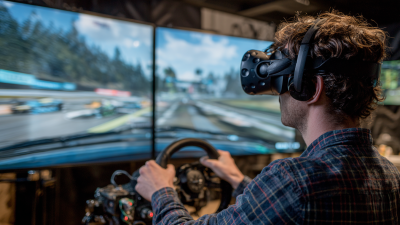
Virtual Reality (VR) simulated driving provides an exciting platform for users to experience the thrill of driving without leaving their homes. To fully grasp the basics of VR simulated driving, it's crucial to understand key concepts such as immersion, interactivity, and realism. Immersion refers to the degree to which the simulation engages the user, allowing them to feel as though they are truly behind the wheel. Proper setup of the VR headset and peripherals enhances this sense of presence, making the experience more enjoyable.

To maximize your VR driving experience, consider the following tips. First, ensure your space is organized and free of obstacles. This will prevent interruptions during your simulation and enhance safety. Additionally, adjusting your VR headset for comfort and clarity is essential as it minimizes discomfort during longer sessions. Finally, take the time to familiarize yourself with the controls before jumping into high-speed scenarios. This preparatory step can significantly enhance your confidence and enjoyment, allowing you to fully immerse yourself in different driving conditions.

By understanding these basic principles of VR simulated driving and applying these tips, users can elevate their experience, whether they are novice drivers or seasoned racing enthusiasts. Embracing this technology allows for unique learning opportunities and thrilling adventures in a safe environment.

Choosing the Right VR Equipment for Optimal Experience

10 Essential Tips for an Immersive VR Simulated Driving Experience

When embarking on a virtual reality (VR) simulated driving experience, the choice of equipment plays a crucial role in determining the quality of immersion and realism. Firstly, selecting a high-resolution headset is essential, as it enhances visual clarity and minimizes the screen door effect. A larger field of view offers a more comprehensive perspective, mirroring real-life driving situations. Look for headsets that feature advanced tracking capabilities, enabling precise movements and reducing lag, which can break the illusion of reality.

Moreover, the importance of audio cannot be overlooked. Immersive sound not only provides cues about the driving environment but also heightens the emotional engagement. Consider a VR setup that supports spatial audio, allowing sounds to come from various directions. Additionally, investing in a compatible controller or steering wheel can significantly enhance the tactile feedback and make the driving experience feel more authentic. The integration of pedals and a supportive racing seat can further mimic real driving conditions, making your VR experience genuinely immersive and enjoyable.

Setting Up Your VR Space for a Seamless Driving Simulation

Creating an optimal virtual reality (VR) space for a simulated driving experience hinges on careful planning and execution. First and foremost, ensure that your designated area is spacious and free from obstacles. A minimum space of 6 feet by 6 feet is recommended to allow for comfortable movement. To increase immersion, consider using blackout curtains or dim lighting to eliminate any external distractions that could detract from the experience. A smooth, uncluttered floor surface will also enhance the feel of driving by providing a stable environment.

Next, pay attention to your setup's dimensions and the position of your VR equipment. Position your VR headset sensors at an optimal height and angle to track your movements accurately. Additionally, arrange your seating in a way that closely mimics a real car’s layout, ensuring the steering wheel and pedals are easily accessible. Incorporating soundproofing elements can also add to the immersive quality by minimizing outside noise. With these adjustments, you can create a seamless and engaging simulated driving environment that enhances the overall experience.

Driving Experience Immersion Factors

Adjusting Settings for Realistic Driving Physics in VR

When it comes to creating an immersive virtual reality (VR) simulated driving experience, adjusting settings for realistic driving physics is crucial. According to a report from the International Automotive Virtual Reality Association, nearly 78% of users report a more engaging experience when the driving physics closely mimic real-world dynamics. This realism is achieved through fine-tuning parameters such as vehicle weight, suspension stiffness, and road surface conditions. Users must ensure that the simulation accurately reflects the feedback they would expect in an actual vehicle, which enhances both the immersion and the educational value of the VR experience.

To achieve realistic driving physics, it’s essential to calibrate the simulation environment. Parameters such as tire friction coefficients, steering response times, and engine torque curves should be meticulously adjusted to reflect their real-life counterparts. According to a study published by the Journal of Virtual Reality Research, simulations that incorporate such detailed physics modeling can enhance user retention and satisfaction by up to 40%. Additionally, employing advanced algorithms to simulate environmental variables such as weather and terrain can further deepen the immersive quality, making users feel as if they are truly behind the wheel. By focusing on these adjustments, developers can transform VR driving simulations into compelling and lifelike experiences that resonate well with both casual and professional users.

Exploring Different Driving Scenarios in Virtual Reality

Virtual Reality (VR) has transformed the way we experience driving simulations, offering an immersive environment that allows users to engage with different driving scenarios. According to a report by the International Data Corporation, the VR market in the automotive industry is projected to grow at a compound annual growth rate of 38.1% from 2020 to 2025. This rapid growth emphasizes the importance of creating compelling virtual experiences that mimic real-world driving challenges.

To enhance your simulated driving experience in VR, consider these tips: First, focus on the sensory feedback. High-quality audio and haptic responses can significantly elevate the realism of driving scenarios. For instance, the rumble of an engine or the sensation of road texture through controllers can make a substantial difference in immersion. Second, explore varied environments—urban landscapes, mountainous terrains, and racetracks each provide unique challenges that can improve your driving skills and adaptability. Research indicates that practicing in diverse conditions can enhance a driver’s performance and response times in real-world scenarios.

Lastly, using realistic driving physics and customizable settings can further enrich your VR experience. Adjusting parameters such as weather conditions, time of day, and traffic density not only challenges the user but also mimics real-life unpredictability. Engaging with these elements creates a dynamic and versatile platform for learning and enjoyment. By immersing ourselves in these diverse driving scenarios, we can unlock the full potential of VR in improving our driving capabilities.

10 Essential Tips for an Immersive VR Simulated Driving Experience

Tip Number Tip Description Driving Scenario Recommended Equipment
1 Customize your VR settings for optimal comfort. City Driving VR Headset, Adjusted FOV
2 Use high-quality audio for immersive sound effects. Night Drive Surround Sound Headphones
3 Practice with different vehicles for versatility. Sport Car Racing Motion Simulator Chair
4 Engage in multiplayer scenarios for social interaction. Rally Competition Online Multiplayer Setup
5 Adjust your driving position for natural ergonomics. Highway Travel Adjustable VR Seat
6 Utilize haptic feedback devices to simulate real driving. Off-Road Adventure Haptic Steering Wheel
7 Experiment with weather conditions for realism. Rainy Conditions VR Environment Simulation
8 Follow traffic rules and simulate safe driving. Urban Commuting Traffic Simulation Software
9 Explore different terrains to enhance driving skills. Mountain Driving Terrain Simulation System
10 Review your performance and learn from mistakes. Driving Assessment Performance Analysis Tools

Utilizing Accessories to Enhance Immersion in VR Driving

To elevate your virtual reality (VR) driving experience, incorporating various accessories can significantly enhance immersion and realism. One of the primary accessories that can transform your VR driving is a dedicated steering wheel and pedal set. These realistic setups provide tactile feedback and allow for precision control, closely mimicking the behavior of an actual vehicle. When coupled with force feedback technology, they can replicate the sensations of road conditions and vehicle dynamics, creating a more lifelike experience that draws you deeper into the simulation.

Additionally, consider integrating a VR headset with high-resolution displays and a wide field of view. A headset that minimizes motion sickness and provides crisp visuals can make a substantial difference in how you perceive your environment while driving. Furthermore, incorporating audio accessories, such as surround sound systems or high-quality headphones, can immerse you even further by faithfully reproducing the sounds of the engine, tires on the road, and ambient noises. By thoughtfully selecting these accessories, you can create an engaging and immersive VR driving experience that transports you into a world of virtual exploration and excitement.

Safety Tips for a Comfortable and Engaging VR Driving Session

When engaging in a virtual reality (VR) driving experience, prioritizing 安全 ensures an enjoyable and immersive session. First and foremost, ensure your play area is clear of obstacles. This not only helps in avoiding physical accidents but also allows you to fully immerse yourself in the driving simulation without the distraction of real-world objects. Having ample space will enhance your ability to react to the virtual environment and maintain a heightened focus on the driving experience.

In addition, it's essential to use comfortable and adjustable gear, such as headsets and controllers, to prevent physical strain. Taking regular breaks during your session can also mitigate the risks of VR-induced discomfort, such as motion sickness. It’s advisable to familiarize yourself with the VR interface and controls before diving into the experience, which contributes to a smoother and more enjoyable ride. Remember, your well-being is paramount; being mindful of your surroundings and how your body feels will greatly enhance your VR driving adventure.

FAQS

: What type of headset should I choose for a VR driving experience?

: A high-resolution headset is essential for enhancing visual clarity and minimizing the screen door effect, thus providing a more immersive experience.

How can I improve my VR driving experience with audio?

Look for a VR setup that supports spatial audio, which allows sounds to come from various directions, enhancing immersion and emotional engagement.

What space requirements should I consider for setting up a VR driving simulation?

A minimum space of 6 feet by 6 feet is recommended to allow for comfortable movement and an immersive experience.

How can I minimize distractions while using VR for driving simulations?

Consider using blackout curtains or dim lighting to eliminate external distractions, which can detract from the overall experience.

What equipment can enhance the tactile feedback during a VR driving experience?

Investing in a compatible controller or steering wheel, along with pedals and a supportive racing seat, can significantly enhance the authenticity of the driving simulation.

What should I consider regarding the positioning of VR equipment?

Position the VR headset sensors at an optimal height and angle for accurate tracking, and arrange your seating to mimic a real car’s layout for an authentic experience.

How can I create a stable environment for my VR driving setup?

Make sure the floor surface is smooth and uncluttered to enhance the feel of driving and ensure safe movement during the simulation.

Why is soundproofing important in a VR setup?

Incorporating soundproofing elements can help minimize outside noise, thereby improving the immersive quality of your simulated driving environment.

Conclusion

The article "10 Essential Tips for an Immersive VR Simulated Driving Experience" provides valuable insights into optimizing your virtual driving sessions. It begins by explaining the fundamentals of VR simulated driving, ensuring that users understand the primary concepts behind this innovative technology. Choosing the right VR equipment is crucial for achieving an optimal experience, while setting up a dedicated VR space can significantly enhance the simulation's seamlessness.

Furthermore, the article emphasizes the importance of adjusting settings for realistic driving physics to create a more authentic driving environment. Readers are encouraged to explore various driving scenarios within virtual reality, enabling them to gain different experiences and learn new skills. Additionally, the use of accessories can greatly enhance immersion, making the VR simulated driving experience more engaging. Lastly, the article concludes with essential safety tips to ensure a comfortable and enjoyable time in the virtual driving realm.

Blog Tags:

Charlotte

Charlotte

Charlotte is a skilled marketing professional at VART VR, one of China's pioneering VR simulator manufacturers located in Guangzhou. With a firm grasp of the latest advancements in virtual reality technology, Charlotte excels in articulating the unique features and benefits of the company’s......
Previous Exploring Real World Applications of the Best VR Play Park in Entertainment and Education Industries