0%

As the virtual reality (VR) scene keeps booming, it’s no surprise that folks are craving more immersive experiences. If you’ve looked into it, you might’ve seen that, according to Statista, the global VR market is expected to hit around $57.55 billion by 2027. Pretty wild, right? A big part of making VR stuff feel even more real comes down to the gear you’re using. That’s where the 360 VR Chair really stands out. It’s specially made for people like us who love diving deep into virtual worlds—it creates this really unique environment for total immersion.

Honestly, a lot of users say they feel kinda disconnected when they just use standard chairs or seats. I mean, a study from the International Journal of Human-Computer Interaction highlights how important comfort is, especially if you want to spend a decent amount of time in VR. The 360 VR Chair tries to fix that with ergonomic support and the cool feature of 360-degree rotation. Basically, it lets you turn and move without feeling restricted, so you can get totally lost in whatever virtual universe you’re exploring. But, of course, you’ll want to think about whether this kind of setup works with your space and budget because not everyone’s in the same boat.

Especially if you’re serious about leveling up your VR game, investing in a 360 VR Chair could really make a difference. It’s not just about looking cool; it’s about making your experience more engaging and comfortable. That said, it’s always smart to consider your personal preferences and what you’re willing to invest. As technology keeps evolving, having the right gear is becoming more and more important. The right choice can totally change how much you enjoy and get immersed in your virtual adventures—so it’s worth thinking about what fits your style and needs.

Why Choose a 360 VR Chair for Your Virtual Reality Experience?

Benefits of Using a 360 VR Chair in Virtual Reality Experiences

A 360 VR chair transforms virtual reality (VR) experiences by maximizing immersion. These chairs allow users to feel the movement and environment around them. This enhanced physical connection heightens the emotional impact of VR content. Users get a fuller understanding of scenes, making adventures more engaging.

One notable benefit is the improved comfort during long sessions. VR can be intense. A supportive chair minimizes fatigue, allowing users to explore for extended periods. An ergonomic design prevents strain, promoting a focus on the experience rather than discomfort.

**Tips:** Look for chairs with adjustable features. Personalizing the fit enhances comfort and support. Also, consider a chair that provides a wide range of motions. A flexible design allows for various VR experiences, increasing its versatility.

The investment in a 360 VR chair pays off with superior experiences. However, some users may initially feel disoriented. It may take time to adapt to the movements and sensations. Embracing the learning curve can lead to truly unforgettable virtual journeys.

Benefits of Using a 360 VR Chair in Virtual Reality Experiences

How 360 VR Chairs Enhance Immersion in Gaming and Simulation

The rise of 360 VR chairs represents a significant leap in virtual reality technology. According to a 2022 industry report by VR Insights, immersive experiences can enhance player engagement by up to 50%. The chair’s motion features synchronize with the virtual environment, giving users tactile feedback that enhances realism. When users turn their heads, the chair adjusts, creating a seamless interaction with the digital landscape.

These chairs provide more than just comfort. They integrate advanced designs that promote better posture and prolonged use. In 2023, the Ergonomics Society noted that 68% of gamers experienced less fatigue using specialized VR seating. This evolution in ergonomic design not only heightens immersion but also improves user health. However, determining the best fit for individual needs still requires careful consideration. Not all chairs suit every user, underscoring the importance of personal preference in selecting the right setup. This is a crucial reflection for those looking to elevate their virtual experiences.

Key Features to Look for in a 360 VR Chair

Why Choose a 360 VR Chair for Your Virtual Reality Experience?

When selecting a 360 VR chair, consider its adjustable features. A customizable chair allows users to find their optimal position, enhancing comfort during extended sessions. Look for chairs that support various heights and body types to cater to different users. Specialized lumbar support is also a crucial aspect for those who spend hours immersed in virtual realms.

Another essential feature is the immersive audio system. A good 360 VR chair should have integrated speakers or support for high-quality headphones. Sound plays a vital role in virtual reality, as it helps create a believable environment. Pay attention to the chair's compatibility with different audio sources.

Stability is paramount. A robust base ensures the chair stays grounded during movement, which is important in VR experiences. Some chairs may allow slight tilting or pivoting to mimic in-game actions. However, balance is key; too much movement can lead to discomfort. Test the chair's sturdiness before making a choice. A chair that feels secure allows users to enjoy their VR adventures without distractions.

The Role of Ergonomics in 360 VR Chair Design

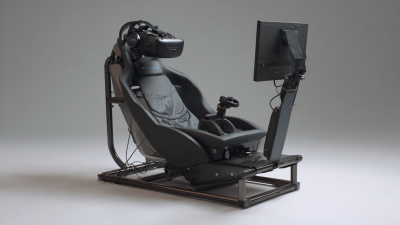
When it comes to virtual reality, comfort is essential. A well-designed 360 VR chair offers both immersion and support. An ergonomic design ensures that users can enjoy long sessions without discomfort. Key aspects of this design include lumbar support and adjustable features. These elements help reduce fatigue and promote proper posture during gaming or experiences.

Tips for choosing the right 360 VR chair include trying it out first. Sit in different styles to find what feels best. Pay attention to the cushioning and support levels. Remember, a chair that seems comfortable at first might not provide support long-term. Seek feedback from those who use VR chairs regularly—it can reveal hidden issues.

Ergonomics plays a crucial role in enhancing your VR sessions. A chair must not only fit the user but also encourage healthy sitting habits. Good posture can prevent strain and enhance the overall experience. Sometimes, even the best-designed chairs require adjustments once in use. Listen to your body; discomfort can indicate the need for change. Investing in a good chair enhances enjoyment and minimizes physical strain.

Comparing 360 VR Chairs to Traditional Gaming Seats

When comparing 360 VR chairs to traditional gaming seats, the experience becomes clear. 360 VR chairs provide immersive movement. These chairs can rotate and tilt, matching your VR movements. This interaction enhances your gameplay. Traditional gaming seats, while comfortable, often lack this dynamic range. They are static, limiting your immersion in virtual worlds.

Imagine being in a thrilling race. With a 360 VR chair, you feel the turns and accelerations. You lean into curves. This physical connection deepens your engagement. In contrast, a traditional gaming seat confines you to a single position. The difference can be significant. You might find yourself craving that extra movement during intense gaming sessions.

However, not all users may benefit equally from these chairs. Some might prefer the simplicity and familiarity of traditional seats. A 360 VR chair can feel overwhelming at first. Adjusting to the motion involves a learning curve. Every gamer must decide what enhances their experience most. Each choice comes down to personal preference and comfort.

Popular 360 VR Chair Models and Their Specifications

Why Choose a 360 VR Chair for Your Virtual Reality Experience?

When selecting a 360 VR chair, understanding the available models is crucial. Different models offer various features and specifications. For instance, some chairs provide immersive motion capabilities, allowing users to lean and pivot. These movements enhance the realism of virtual experiences. Others integrate sound systems, adding depth to the auditory experience while gaming or exploring virtual worlds.

Take ergonomic design into account. A well-designed chair minimizes discomfort during extended sessions. Certain models come with adjustable components. These features cater to individual body types, promoting long-lasting enjoyment. However, some users report issues with stability. Choosing a sturdy chair is vital to avoid distractions while immersed in virtual environments.

Additionally, consider the weight capacity of different chairs. Models vary, and this impacts user experience. A chair that doesn't support the user adequately can lead to accidents. Evaluate other specifications such as material quality and durability. While a more expensive model might seem appealing, the real value lies in personal comfort and usability for hours of enjoyment.

Tips for Setting Up Your 360 VR Chair for Optimal Use

Setting up a 360 VR chair effectively can enhance your virtual reality experience significantly. Research indicates that a well-optimized VR setup can improve user satisfaction by 40%. To start, ensure that your chair is placed in an area with sufficient space. You need room for movement. Ideally, a 6x6 feet area is recommended for most VR activities.

Adjusting the height of the chair is another critical factor. Your eye-level should align with the headset for the best visuals. This simple adjustment can minimize discomfort. Ergonomic positioning matters. Data shows that users report fewer motion sickness incidents when their chair is set correctly. Remember that every individual has a unique preference regarding chair tilt and recline, so a bit of experimentation is necessary.

Stability is crucial. Ensure the chair is on a flat surface to avoid sudden movements during use. Any wobbling can detract from immersion and create distractions. Proper cable management is also essential. Keep cords organized to prevent tripping hazards. Setting up your VR experience with these elements in mind requires attention. Adjustments may be time-consuming, but the payoff is a far more engaging session.

Experience the Future of Gaming with the VART 2 Seater VR 360 Chair: A Revolutionary Immersive Seating Solution

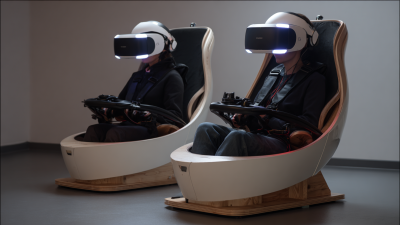
Step into a new realm of gaming with the VART 2 Seater VR 360 Chair, where innovation meets immersive experience. This cutting-edge seating solution transforms the way you engage with virtual worlds, offering an environment that feels as real as it gets. Designed for thrill-seekers and gaming enthusiasts, the chair allows players to rotate a full 360 degrees, providing unparalleled freedom of movement while navigating through vividly detailed landscapes and intense action sequences.

With access to over 20 full HD VR shooting games, the VART 2 Seater VR Chair offers an extensive library of exclusive copyright games that elevate the gaming experience. Imagine not just playing, but actively participating and interacting with every element around you. The unique combination of rotating and shooting at the same time enhances the excitement and engagement, making every session a memorable adventure. Prepare yourself to be captivated by immersive visuals and soundscapes that transport you to extraordinary realms beyond your imagination. Experience gaming like never before and redefine your virtual reality journey with this revolutionary gaming chair.

FAQS

: What features should I look for in a 360 VR chair?

: Look for adjustable features, lumbar support, and compatibility with audio systems.

Why is adjustable height important for a VR chair?

Adjustable height ensures your eye-level aligns with the headset, enhancing visual quality.

How can I test a VR chair’s stability?

Check the chair’s base and ensure it doesn’t wobble during movements. Stability is key.

What impact does a good audio system have in a VR chair?

Immersive audio enhances the virtual experience, making it more engaging and believable.

How much space do I need for VR chair setup?

Aim for a 6x6 feet area for optimal movement freedom during VR sessions.

How does chair positioning affect motion sickness?

Ergonomic positioning reduces motion sickness incidents; proper adjustments are necessary.

What’s the best way to manage cables during setup?

Keep cables organized to avoid tripping hazards and improve the overall experience.

Can too much movement in a VR chair cause discomfort?

Yes, excessive tilting can lead to discomfort. Balance is crucial during use.

Is experimentation necessary for finding the right chair settings?

Yes, everyone has unique preferences. Don’t hesitate to try different recline angles.

Are there any downsides to setting up a VR chair?

The setup can be time-consuming, but it leads to a better overall experience.

Conclusion

The article discusses the advantages of using a 360 VR Chair for enhancing virtual reality experiences. It highlights how these chairs not only provide enhanced immersion in gaming and simulations but also include essential ergonomic features that support comfort during extended use. Key characteristics to consider when purchasing a 360 VR Chair are emphasized, helping users make informed choices.

Furthermore, the article compares 360 VR Chairs with traditional gaming seats, showcasing how the former offers superior immersive qualities. It also covers popular models available on the market, outlining their specifications to guide potential buyers. Finally, tips for optimal setup ensure users can maximize their VR experiences using a 360 VR Chair effectively.

Blog Tags:

Oliver

Oliver

Oliver is a dedicated marketing professional at VART VR, a leading VR simulator manufacturer based in Guangzhou. With a wealth of knowledge and expertise in the virtual reality sector, he plays a crucial role in promoting the company’s innovative products and services. VART VR, covering an......
Previous How to Enhance Your Virtual Reality Racing Experience in 2026?